
How to Build a Reusable eLearning Content Library for Enterprise Training
Every enterprise training team carries the same quiet embarrassment: a shared drive full of finished courses nobody can reuse. The compliance module explains data privacy clearly. The onboarding course has a strong escalation scenario. All of it exists; none of it can be lifted out, so each new project starts by rebuil
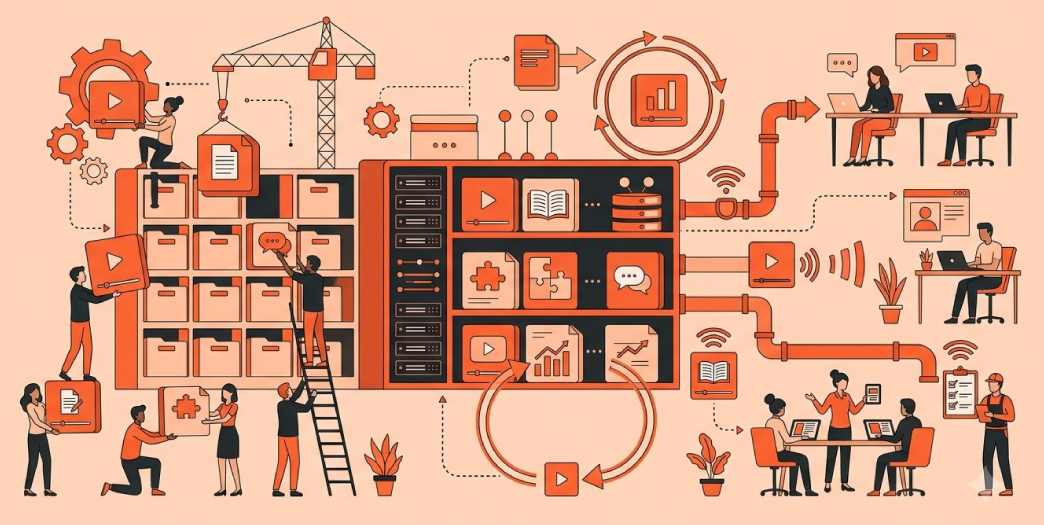
A reusable eLearning content library is a governed collection of modular learning objects and digital learning assets, each described with consistent metadata, that teams assemble into new courses instead of rebuilding from scratch. Building one means splitting monolithic courses into single-objective modules, tagging every object so it can be found, assigning owners and review dates, and keeping content independent of any one course. Done well, corporate training content stops being a one-time expense and becomes an asset that compounds.
Introduction
Every enterprise training team carries the same quiet embarrassment: a shared drive full of finished courses nobody can reuse. The compliance module explains data privacy clearly. The onboarding course has a strong escalation scenario. All of it exists; none of it can be lifted out, so each new project starts by rebuilding something the organization already owns.
That is the real argument for an eLearning content library: not storage or tidier folders, but treating corporate learning content as building blocks rather than one-off deliverables. The harder question is how to build one without creating an expensive digital attic.
A Course Catalog Is Not an eLearning Content Library
A catalog lists finished courses. An eLearning content library makes the parts inside them reusable. The difference is architecture: modular objects, consistent metadata, and named ownership, not completed projects sorted by date.
Most organizations already have something they call a library: an LMS catalog, a shared drive, vendor folders full of online training content. The catalog cannot tell you which scenario, diagram, or assessment inside them could serve a different audience tomorrow. An eLearning content library closes that gap by managing the parts, not the finished course, as the real asset.
| Particulars | Course Catalog | eLearning Content Library |
| Unit of management | Finished course | Reusable object |
| How content is found | Title or folder name | Searchable metadata |
| Cost of a new course | Full build | Assembly, plus gaps |
| Update effort | Edit every affected course | Edit once, then propagate |
Why Most Corporate Training Content Cannot Be Reused
Reuse rarely fails from lack of intent. It fails because of how courses get built: sealed, sequential experiences with context baked into every screen, which makes good explanations impossible to lift out.
Phrases like “as we saw in the previous module,” text locked inside images, and assessments tied to one course’s scoring all prevent reuse. Good online training content ends up welded to the course around it.
The cost rarely shows up in a single project budget, but it adds up. Published benchmarks drawn from ATD and Chapman Alliance research put eLearning content development at roughly 34 to 217 hours per finished hour of training, depending on interactivity. Industry-wide, the average cost per learning hour used has climbed to $165, up 34% from $123 the year before. When rebuilding corporate training content you already own, costs that much; reuse becomes a budget line.
The Building Blocks: Reusable Learning Objects and Digital Learning Assets
Reuse needs a shared vocabulary. Digital learning assets are the raw pieces, reusable learning objects combine them around one objective, and courses are simply assemblies of those objects.
The ADL Initiative designed SCORM so content objects would be reusable, interoperable, accessible, and durable across systems. SCORM separates an asset, any piece of digital information such as text, an image, or sound, from a shareable content object, a collection of assets forming one launchable learning resource.
| Level | What It Is | Reuse Potential |
| Digital learning asset | A single image, clip, narration track, or diagram | Highest, used across many objects |
| Reusable learning object | One objective, one short module, one knowledge check | High, assembled into many courses |
| Course | A sequenced assembly of objects for a role | Moderate, tied to an audience |
Modular Course Design Is What Makes an Object Travel
Modular course design decides whether an object can move between courses. The test: could this module drop into a different course without editing a sentence? If not, it is not yet reusable.
- One objective per module, clear enough to match against a learner need
- Context-independent language, with no references to earlier or later modules
- A self-contained knowledge check, so the module can be assessed wherever it lands
- Text kept as editable layers, never baked into images
- Short enough for one sitting, which keeps updates small
None of this is exotic. It is eLearning content development with one extra question at every step: where else could this be used?
Metadata Decides Whether Anyone Can Find Anything
A library nobody can search is a graveyard with tidier folders. Consistent metadata makes digital learning assets findable, and findability turns reuse from an intention into a habit.
ADL’s requirements describe reusable content as accessible, meaning it can be indexed and found through metadata, not merely stored. The IEEE Learning Object Metadata standard exists for this purpose: it specifies which aspects of a learning object should be described, and defines a learning object broadly as any digital or non-digital entity usable for learning, education, or training.
You do not need the full standard on day one. A workable schema covers:
- Topic and learning objective
- Audience, role, and proficiency level
- Format, duration, and language
- Source document and version
- Content owner and review dates
- Regulatory or policy tie, where relevant
Learning content management lives or dies on whether these fields are filled in consistently. Make them mandatory at publishing, so corporate learning content is findable from day one.
Learning Content Management After Launch: Governance Is the Hard Part
Reuse multiplies value and risk together. One outdated object copied into forty courses becomes forty problems, so learning content management needs owners, review triggers, and a retirement process.
The instinct is to treat an eLearning content library as a technology purchase. It is mostly an operating model. The repository is the easy part; the hard question is who is accountable when the policy behind an object changes.
- A named owner for every object, not a team alias
- Review triggers tied to the source document, so a policy change flags every object built from it
- Version history showing which courses use which version
- A deprecation rule, so retired objects leave courses instead of lingering
- Usage tracking, so you can see where each object lives
Organizations that skip governance do not get an eLearning content library. They get a larger, harder-to-search shared drive of corporate learning content.
Where Reuse Goes Wrong
Reuse is not free and not always wise. Over-fragmenting content, forcing objects into contexts they do not fit, and neglecting maintenance are the failure modes worth designing against.
- Over-granularity. Hundreds of tiny objects nobody can assemble into a coherent course.
- Context leakage. An object written for sales that quietly confuses support.
- Reuse for its own sake. A purpose-built course sometimes beats a patched assembly.
- Silent drift. Online training content that was accurate at publication and never revisited.
The goal is not maximum reuse. It is deliberate reuse, where the team can say why an object belongs in a course and who will notice when it stops being true.
A Practical Build Sequence for Your eLearning Content Library
Decide structure before converting anything. Tagging a mess only produces an organized mess, so the order of these steps matters more than the speed of any single one.
- Audit what exists. Inventory courses, decks, SOPs, and manuals, noting which sources drive each.
- Define the taxonomy. Agree on the metadata schema, roles, and topic hierarchy before touching content.
- Break content into single-objective objects. Apply modular course design so each module passes the drop-in test.
- Tag, store, and assign. Publish each object with metadata, an owner, and a review date.
- Assemble before you build. Start every new course from the eLearning content library, so eLearning content development focuses on the gaps.
- Measure and retire. Track which corporate training content gets reused, and remove what never does.
How BrinX Fits Into Building an eLearning Content Library
The slowest step in building a library is converting documents, decks, and SOPs into structured, modular learning. That conversion is the step BrinX is built to accelerate.
BrinX converts existing SOPs, policies, manuals, and presentations into structured, interactive eLearning with learning objectives, assessments, and multimedia, exported as SCORM or xAPI packages, with instructional designers reviewing output before it reaches a learner. For a team building an eLearning content library, the existing document estate becomes raw material for modules rather than a backlog waiting for eLearning content development capacity. Taxonomy and governance stay with your team; the conversion no longer has to be done by hand.
Key Takeaways and Conclusion
An eLearning content library is an operating model, not a folder. Reuse compounds when objects are modular, findable, and owned, and collapses when any one is missing.
- A course catalog lists courses. An eLearning content library manages reusable parts.
- Modular course design lets online training content travel between courses.
- Consistent metadata makes digital learning assets findable.
- Governance keeps corporate learning content from going stale at scale.
- Deliberate reuse beats maximum reuse.
Most enterprises already own the raw material for a library, in documents nobody has had time to convert. Book a demo with BrinX to see how your existing SOPs, policies, and presentations could become the first modules of an eLearning content library built for reuse.
FAQs
What is an eLearning content library?
An eLearning content library is a governed collection of reusable learning objects and digital learning assets, tagged with consistent metadata, that teams can search and assemble into new courses. It manages the parts inside courses, not only the finished courses themselves.
What are reusable learning objects?
Reusable learning objects are short, self-contained learning units built around a single objective, with their own content and knowledge check. Because they avoid references to other modules, they can be placed into different courses without editing, which is what makes reuse practical.
How is an eLearning content library different from an LMS?
An LMS delivers courses and tracks learners. An eLearning content library manages the reusable pieces used to build those courses, including how they are tagged, owned, versioned, and updated. Many organizations need both, since one handles delivery and the other handles reuse.
How granular should reusable learning objects be?
Granular enough to teach one objective and move into another course unchanged, but not so small that nobody can assemble them into a coherent experience. If building a course means stitching together dozens of fragments, the objects are probably too small.
Who should own learning content management in an enterprise?
Every object needs a named owner accountable for accuracy, ideally the subject matter expert closest to the source document, with L&D responsible for the schema and governance process. Shared team aliases usually mean nobody notices when content goes out of date.
Turn your content into a course
BrinX.ai converts your SOPs, policies, and training documents into multimedia-rich eLearning modules, fast.
Build your first course free